Create new organization
Instance administrators can create new Totem organizations. An organization could represent a unique client, a specific CAGE code, or a subsidiary of a larger enterprise. This page demonstrates how to create a new Totem organization from scratch. To learn how to create an organization by cloning an existing organization, see our Organization Cloning page.
- Log in to Totem.
- Navigate to the Organizations page.
- In the top-left corner, select Create Organization.

- Populate the organization creation fields. Descriptions of each field are below.
- Name (Required): The business name of the organization (e.g., “ACME Manufacturing”).
- Alias (Required): A condensed version of the business name. Used for simplified referencing of the organization throughout the System Security Plan (SSP).
- Description (Optional): Any details about the company that is pertinent for its Totem users to know.
- Assessment Type (Required): The first cybersecurity assessment framework you’d like displayed in Totem. You will be able to toggle between the different frameworks after you finish creating the organization.
- CMMC Practice Level (Required): Only appears when you’ve chosen the CMMC Assessment Type. Choose between CMMC L1, L2, or L3. You can toggle back and forth between these at any time later.
- Lock Assessment Type (Required): If enabled, will prevent any Owners of the organization from changing the Assessment Type of the organization. Helpful if you want to restrict your users only to one framework (e.g., CMMC L1). You can toggle this feature on/off at any time.
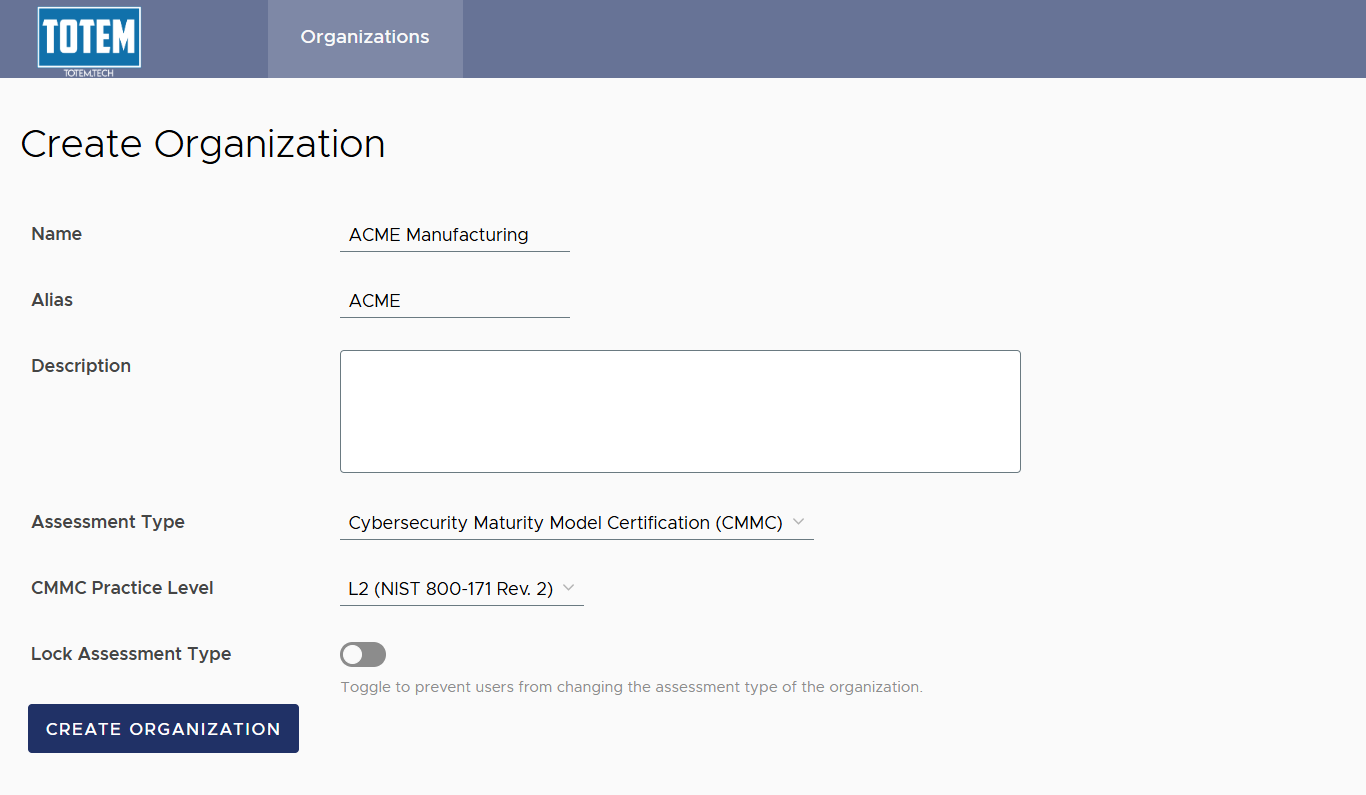
- Select Create Organization. Wait approximately 30 seconds for the organization build to complete before navigating to the Dashboard.