
Building a System Security Plan (SSP)
A System Security Plan (SSP) is the “blueprints” for how an organization implements cybersecurity. Often, SSPs are aligned with a particular standard or framework relevant to an organization’s industry. For instance, defense contractors typically build SSPs that are aligned with NIST SP 800-171, but this may vary if they also operate in other spaces, especially those that are regulated. Companies that operate in unregulated spaces but still want to implement cybersecurity practices also typically will choose a standard — e.g., the Australian Cyber Security Centre Essential 8 — to align their SSP with. Having a standard with actionable objectives to implement makes building and managing an SSP significantly easier in the long-run.
Totem helps you build your SSP in accordance with specific cybersecurity standards, requirements, and objectives. To Totem Technologies, the core elements of an SSP include:
- A description of the “system”; i.e., how the organization handles sensitive information requiring protection
- Justification for how you’ve implemented a cybersecurity requirement or objective
- Mention of any shared responsibilities with third-parties helping you satisfy a requirement or objective
- References to sources of compelling evidence to prove you’ve met a requirement or objective
We’ve developed Totem to facilitate SSP creation in this manner. Whether you are pursuing CMMC assessment or just want a defensible cybersecurity posture, Totem can help you formulate your plan. This guide walks you through creating an SSP in Totem. There is a lot to think about when building an SSP, so if you are not already, consider subscribing at the Engaged Totem tier to get access to our full CMMC training library, including details walk-throughs on building an SSP!
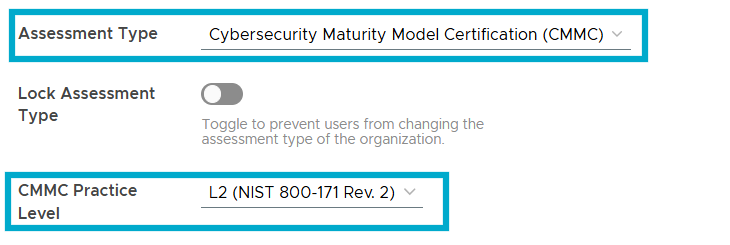
- First, navigate to the Manage module. Confirm that the currently loaded Assessment Type and (if relevant) CMMC Practice Level are both what the organization is currently pursuing compliance with. If not, change to your appropriate Type and Level. Currently, Totem supports:
- CMMC L1 (FAR 52.204-21), L2 (NIST SP 800-171 rev. 2), and L3 (NIST SP 800-172 rev. 2)
- NIST SP 800-171 rev. 3
- ISO 27001:2022
- HIPAA 405d
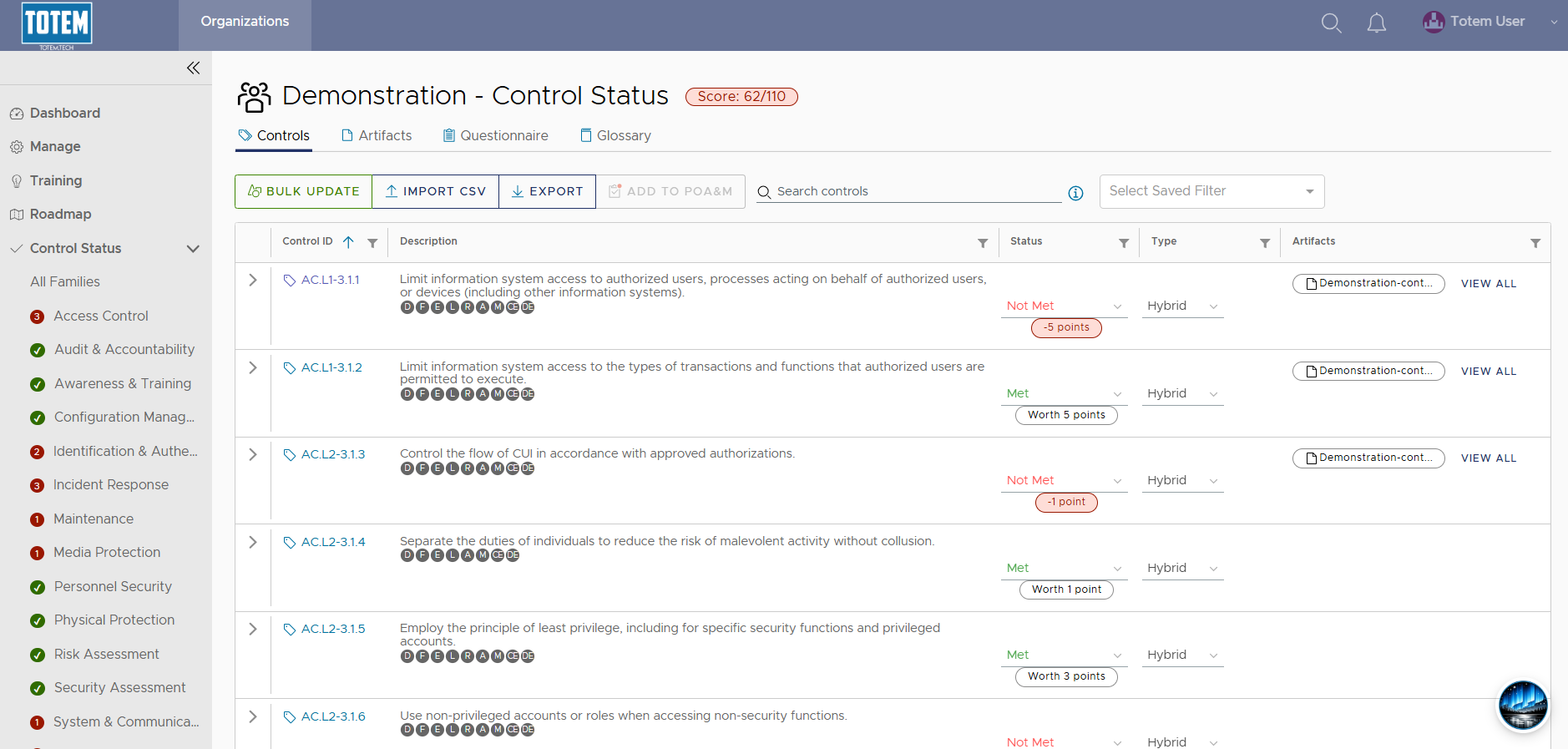
- Return to the Control Status module. You will see the list of security controls aligned with the framework you loaded in the previous step.
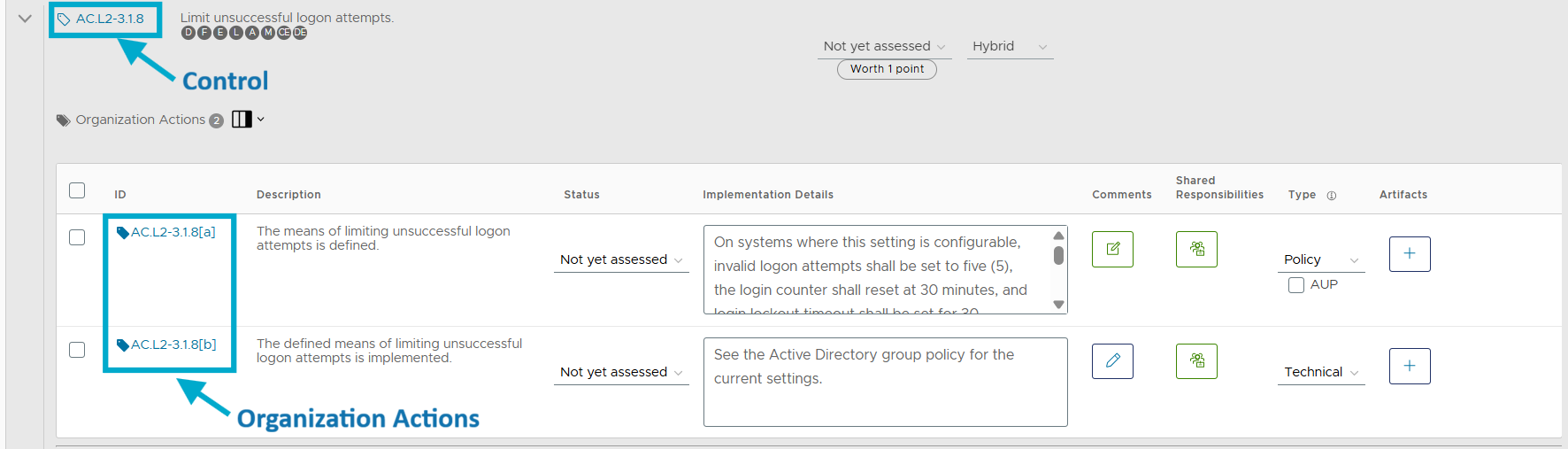
- Expand the drop-down for a given security control. If you are beginning the SSP creation process from scratch, you will notice that all controls are in a state of Not yet assessed. Put simply, one of the goals of creating an SSP is to ensure all controls are Met. This is done by ensuring each control’s Organization Actions (referred in other standards such as NIST SP 800-171A as Assessment Objectives) are Met. Essentially, a control becomes Met when all of its Organization Actions are Met.
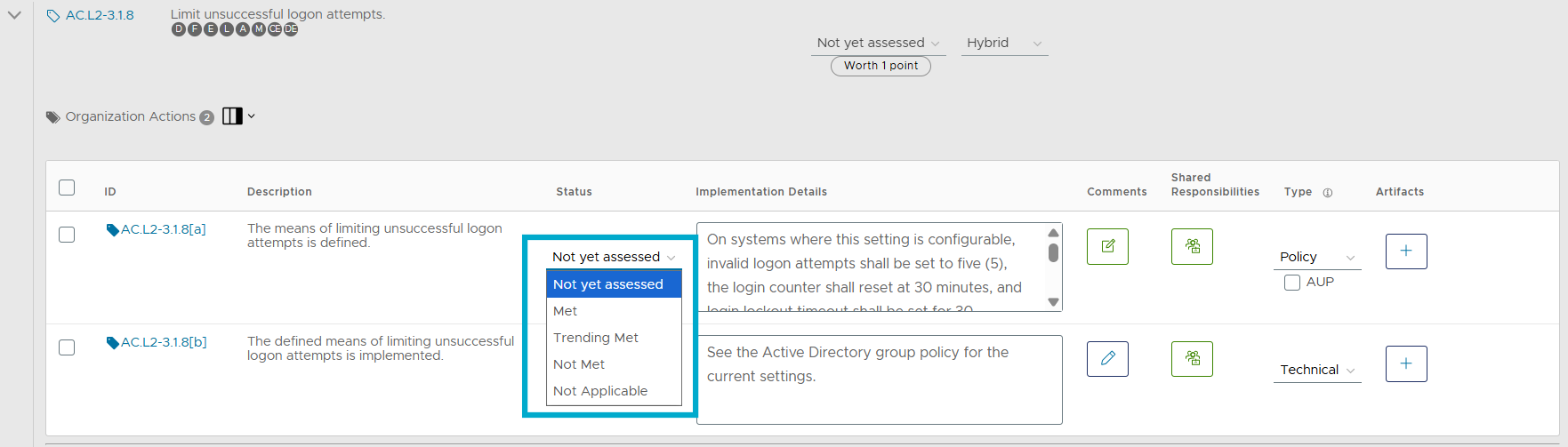
- When you select the Status dropdown for a given Organization Action, you’ll be presented with the following options:
- Met: The organization has implemented the requirement.
- Trending Met: The organization has not yet fully implemented the requirement but has made progress in doing so. This is a Department of War (DoW)/CMMC-specific Status. Alternatively, you may choose to just use Not Met for any Organization Actions that are not implemented.
- Not Met: The organization has not yet implemented the requirement.
- Not Applicable: For various reasons, the requirement is not applicable to the organization. Note: For DoW contractors, marking any requirement as Not Applicable requires a waiver directly from the DoW, which is extremely rare. If a requirement is truly Not Applicable, the guidance is to mark it as Met, then describe via the Implementation Details field how it is not applicable and therefore Met.
- For Organization Actions you have met, you’ll then need to populate the Implementation Details fields for those actions. This field is the core of your SSP, as it is the justification of how your organization satisfies the requirement. While you can utilize a template to help with this, it is critical that you customize any template language to reflect how you actually meet the requirement. To populate the Implementation Details field, you can either free-type in the field or open the pop-out modal.
- Note: Many of the requirements can be confusing to interpret. Consider using our AI assistant, Aurora, to assist with the interpretation and provide recommended details given your organization context!
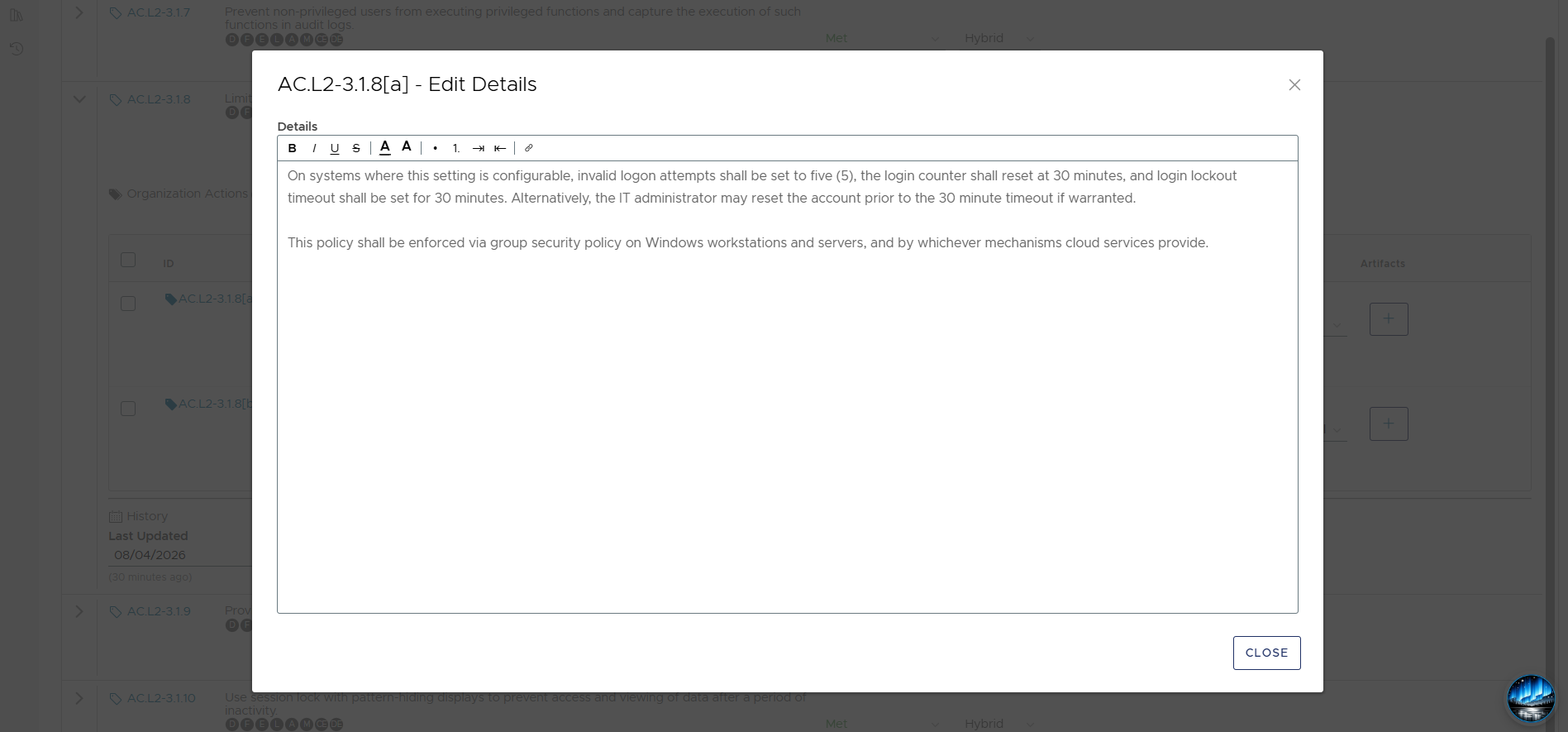
- Once you’ve described how you have met a requirement, you’ll want to consider sources of compelling evidence to prove this, especially if you are preparing for a third-party assessment. The Comments field is a great location for doing this. If utilizing one of Totem’s SSP templates, you’ll see that the Comments field contains suggestions of compelling evidence (CE) for many of the requirements. Evidence could come in the form of a supplemental policy document or artifact, a reference to another resource such as a cloud service, or a stakeholder to interview. It ultimately depends on what the requirement is asking for and the organization’s preferred method for proving their implementation.

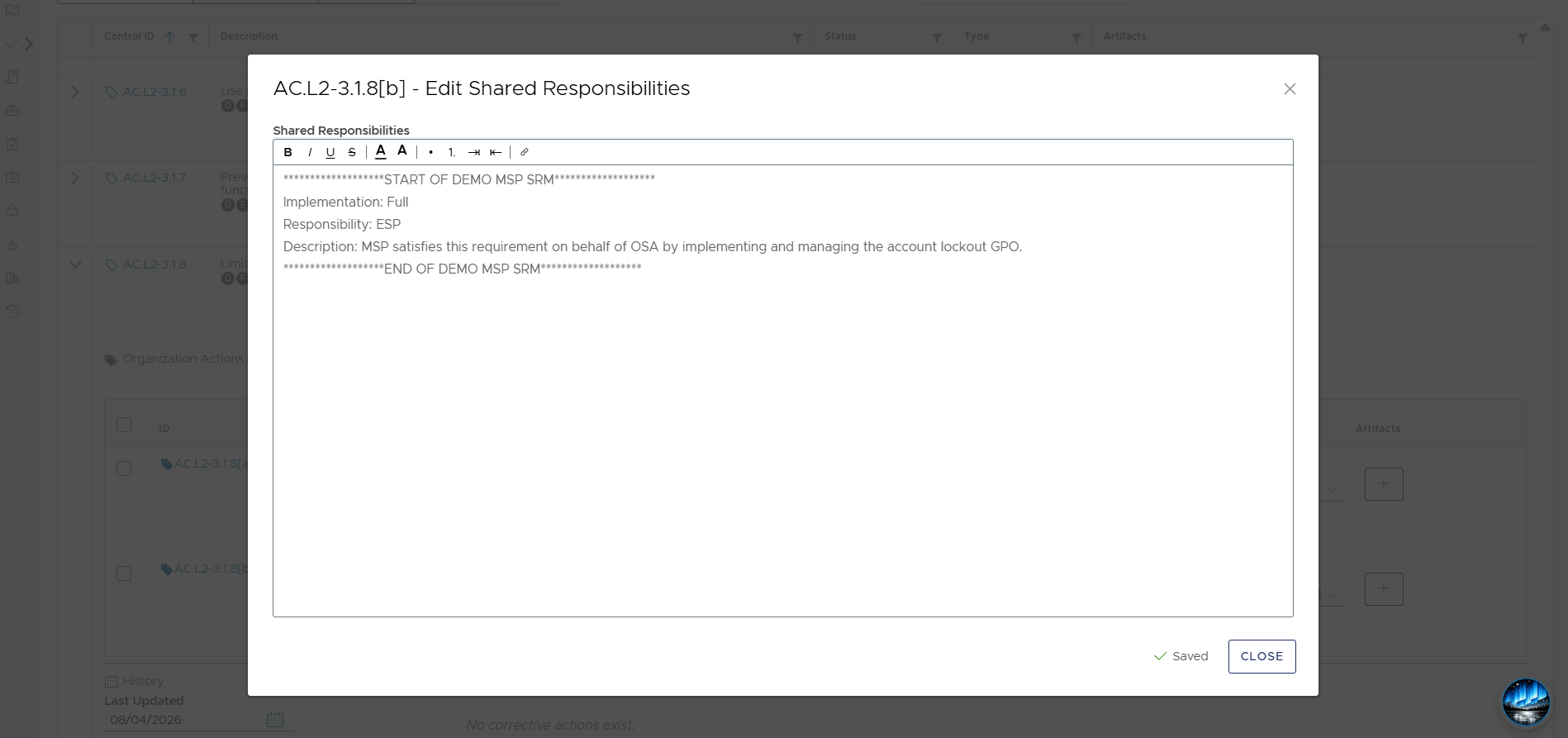
- Next is the Shared Responsibilities field. Nearly all businesses — small and large — rely on external service providers (ESP) to help with cybersecurity. Shared responsibility is how an organization identifies exactly how an ESP helps them satisfy a particular requirement, whether fully, partially, or not at all. Refer to our Shared Responsibility blog for more on this, particularly in the context of CMMC. If you are working with an ESP, and they have committed to help you satisfy some of your cybersecurity requirements, you’ll need to know exactly which ones they are helping with. A key document you can ask them for is their Shared Responsibility Matrix (SRM), also often referred to as a Customer Responsibility Matrix (CRM). This matrix is intended to highlight exactly how the provider’s services align with the required standard (e.g., NIST SP 800-171A). Once you’ve retrieved your provider’s SRM, you can input it into Totem via the Shared Responsibilities field.
- Lastly, you’ll want to consider if there are any Artifacts you’d like to associate with the requirement. In other words, is there a supplemental document, source of evidence, or anything else that could be uploaded to Totem to help prove compliance? For example, if you mention that you use employee training to help satisfy a certain requirement, you may want to put together an Acceptable Use Policy document as evidence of what employees are trained on. You can then upload the Artifact and associate it with the requirement right in Totem.

This guide only scratches the surface on SSP creation. If you are not already, consider subscribing at the Engaged Totem tier to get access to our full training library, including details walk-throughs on building an SSP!