v6.0 Release Notes
New enhancements include:
- AI Assistant

Introducing Aurora, Totem's new AI assistant! Aurora brings powerful artificial intelligence capabilities to your organization's fingertips as you work towards CMMC compliance. Aurora is not a "silver bullet" to achieving CMMC certification, but she can help in a number of ways, including:
- Summarizing your compliance status
- Identifying weaknesses, risks, or discrepancies in your existing documentation, and providing suggestions for improvement
- Writing recommended policies given your organization's context or scenario
- Providing layperson interpretations of controls and assessment objectives
- Making bulk updates to controls and assessment objectives
- Providing recommendations in accordance with official CMMC, NIST, DFARS, and relevant regulatory sources
- And many more!
Aurora is never trained on your organization's data. You can read more about our AI security features here. Aurora is available to all Totem™ users and does not require a specific subscription tier. Any changes made by Aurora can be reverted.
2. Continuous Monitoring Module

You can now create, assign, and track continuous monitoring tasks right in Totem. No more spreadsheets! Choose from several dozen pre-created continuous monitoring task templates or build your own from scratch. Assign tasks to internal or external team members, and they will receive an email notification when their tasks are coming due. Record completion of continuous monitoring tasks should you need them as evidence later. Associate your continuous monitoring task with any source, such as one or multiple controls, assessment objectives, regulations, or any other source you prefer.
Continuous Monitoring tasks assigned to you will appear on your Dashboard in the new "My Tasks" widget. This new module is especially helpful for meeting NIST 800-171 rev. 2 control 3.12.3: Monitor security controls on an ongoing basis to ensure the continued effectiveness of the controls.
3. Integrated Learning Management System (LMS)

Customers subscribed to our Engaged tier will notice a new "Training" module in the left-hand menu. Selecting this will automatically authenticate you into our new integrated LMS, where you can view our complete CMMC training library or book consultations with us. No more juggling multiple logins!
4. Rich Text Editor in Input Fields

Input fields now include a Rich Text Editor where you can add bold, italics, underline, text coloring, highlighting, indents, bulleted/numbered lists, and hyperlinks.
5. Improved Artifact Linking w/ Version Control

Totem now includes a much-improved mechanism for creating, linking, and updating artifacts (evidence). All Attachments now are given their own Artifact, where one Artifact can contain multiple Attachments. Artifacts are linked to an Organization Action (OA), whereby updating the Artifact does not require re-linking to all OAs, significantly reducing manual effort when associating evidence. With Version Control, you can now update Artifacts to include new attachments, add change notes, and revert back to previous versions if needed.
All attachments now also include their corresponding SHA-256 hash. You can export a mapping of your Artifacts into an evidence traceability matrix. Additionally, you can download all attachments via a single .ZIP file.
Other enhancements and fixes in Totem™ v6.0 include:
- Improved login experience and MFA options
- NOTE: All users will be required to reset their password on first login in v6.0.
- Admins can now clone organizations
- Admins can upload local Shared Responsibility Matrices (SRM) and populate SRMs for their clients' System Security Plans via the Manage page
- Organization Owners can select SRMs from Totem Tech's global SRM database via the Manage page
- New Glossary page where the organization can specify terms and acronyms
- New Software Baseline page in Inventory module
- Two new POA&M Corrective Action Plan (CAP) types to align with the current CMMC rule: Operational: Temporary Deficiency and Operational: Enduring Exception. The previous "Regular" CAP type has been reworded to Non-Conformance
- Global search filters can be created and selected by all organizations in an instance
- NIST 800-171 / SPRS score now also appears in Control Status window
- CMMC L3 references updated to reflect latest from DoW
- Resources page visual enhancements
- Users can now upload CSV files
- CMMC Assessment Type now includes a "DIBCAC Evidence" info element button for all controls
- Global search now highlights text found in Implementation Details field
- Notification email improvements
- All
- Bug fixes
- Security fixes
v5.3 Release Notes
Updates made in Totem™ version 5.3 include:
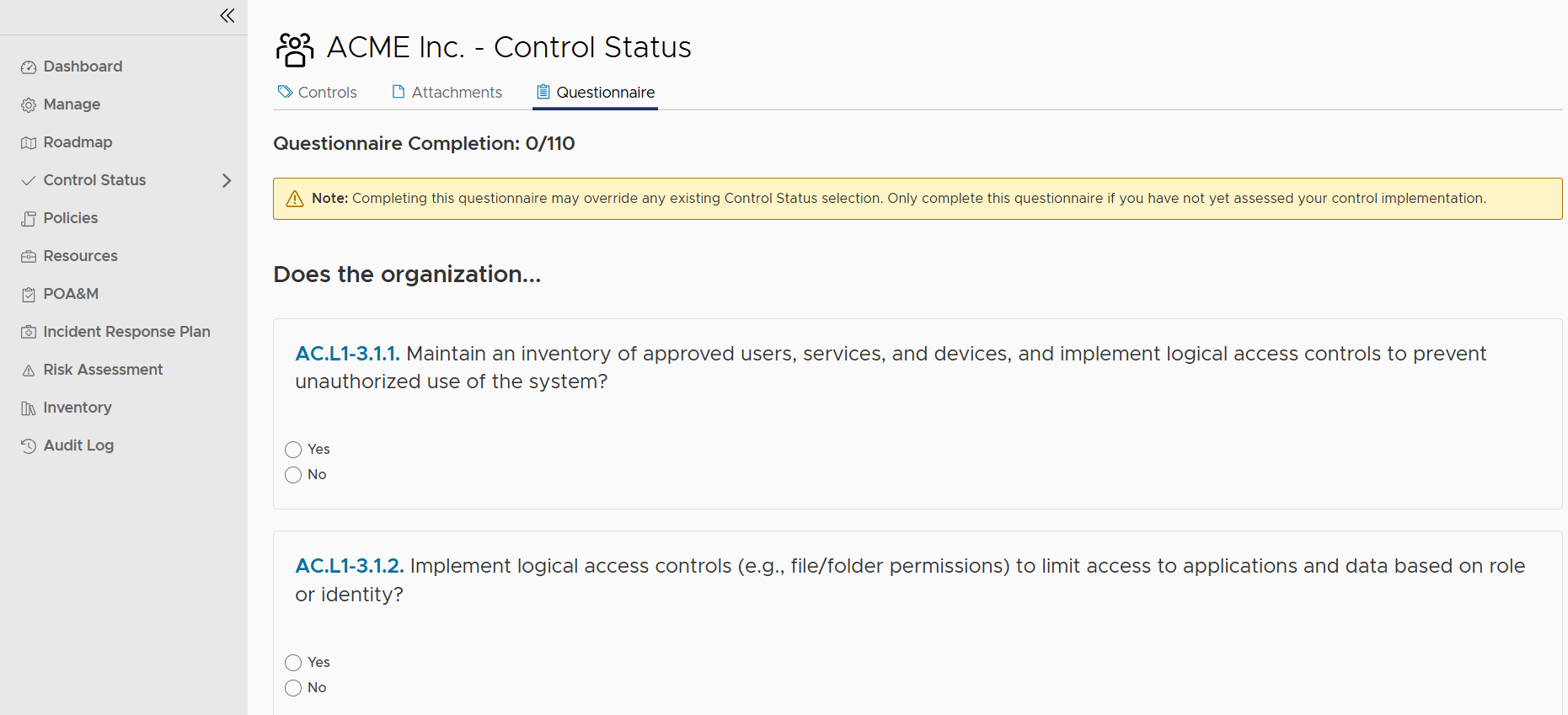
- A new Questionnaire feature in the Control Status module, allowing contractors and their ESPs to quickly perform a self-assessment against our layperson interpretation of either the CMMC Level 1 or Level 2 requirements:
-
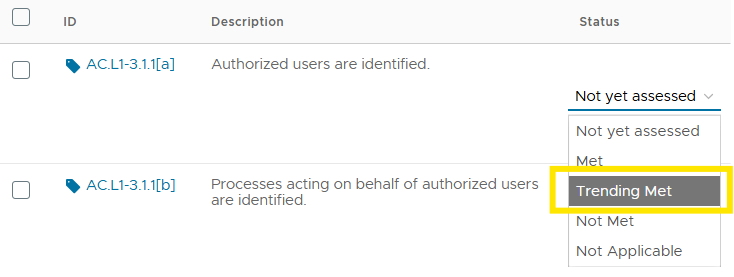
- This functionality is ideal for those just beginning their CMMC compliance journey. Marking a question "Yes" will automatically set that control and each of its Assessment Objectives to a new Assessment Type, "Trending Met" (see next bullet). Marking the question "No" will automatically set that control and each of its Assessment Objectives as "Not Met." If you have already performed your self-assessment via the Controls page, you do not need to also complete the Questionnaire, as doing so will overwrite existing assessment status on the Controls page.
- This new Questionnaire functionality introduces a new Assessment Type, "Trending Met". This will help contractors better demonstrate and track their progress towards a final compliance state of "Met."
- The NIST 800-171 Revision 3 framework now includes the DoD's defined Organization-Defined Parameters (ODP). This will be critically important once the DoD updates the CMMC Level 2 standard to require NIST 800-171 Revision 3 rather than the current Revision 2. Each Assessment Objective in NIST 800-171 Revision 3 with a corresponding ODP value are clearly shown in Totem:

-
- ODP values can be viewed by selecting the ODP button within that objective:


-
- And the ODP values can also be seen as "ghost text" within the Implementation Details field:

Other improvements and fixes in Totem 5.3 include:
- Improved POA&M JSON import functionality
- Admin console now re-enforces authentication and session timeout
- Other security improvements
- Other bug fixes
v5.2 Release Notes
Updates made in Totem™ version 5.2 include:
- Removed the save buttons from auto-save free-form fields to allow more space for typing
- Added a column display selector to allow the user to select which Organization Action columns to display or hide, freeing up space to make the Implementation Details field larger:

- Added an orange border around free-form fields that have unsaved changes
- Reduced the volume of email notifications by ensuring notifications are not sent every time a free-form field auto-saves
- Added hover-over tool-tips to the numbers in the Control Status left-hand menu module

- Other bug fixes
- Other security fixes
v5.0 Release Notes
Updates made in version 5.0 include the following:
- A new "Roadmap" module! Track your CMMC completion using strategic milestones.

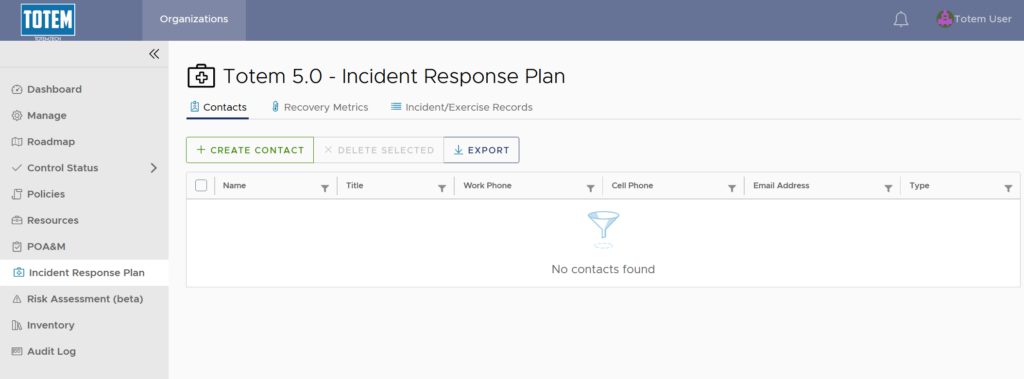
- A new Incident Response Plan module! Build your Incident Response Plan, identify recovery metrics, and record incident tabletop exercises.
- Dashboard now shows date of last score update
- All NIST 800-171 controls show their point value
- An improved Hardware Inventory interface, which now includes additional inventory data columns
- Corrective Action Plans can now be created without any Assessment Objectives (Organization Actions) associated with them
- CUI and Hardware Inventory now exportable
- POA&M Gantt Chart visual improvements
- Email notifications disabled by default; users can enable in My Profile
- Users can now reseed their MFA through My Profile
- Risk Assessment Asset Type description now permits some special characters
- Other security improvements
- Other bug fixes